Inboxto for Developers: Disposable Email API, Custom Domains & Email Testing
Email tests fail in a particularly expensive way: the application appears healthy, but the message goes to the wrong place, arrives too late, or cannot be read by the test when it matters. A disposable email API can make that workflow reliable, but only if the inbox model matches the life of the test.
For a single manual check, a short-lived inbox can be enough. For browser tests, QA environments, repeated account verification, or a test domain that your team controls, a persistent inbox with an API is a better foundation. The goal is not to make a fake identity that defeats a service's rules. It is to isolate test mail from real people and give your team a mailbox it can reliably inspect.
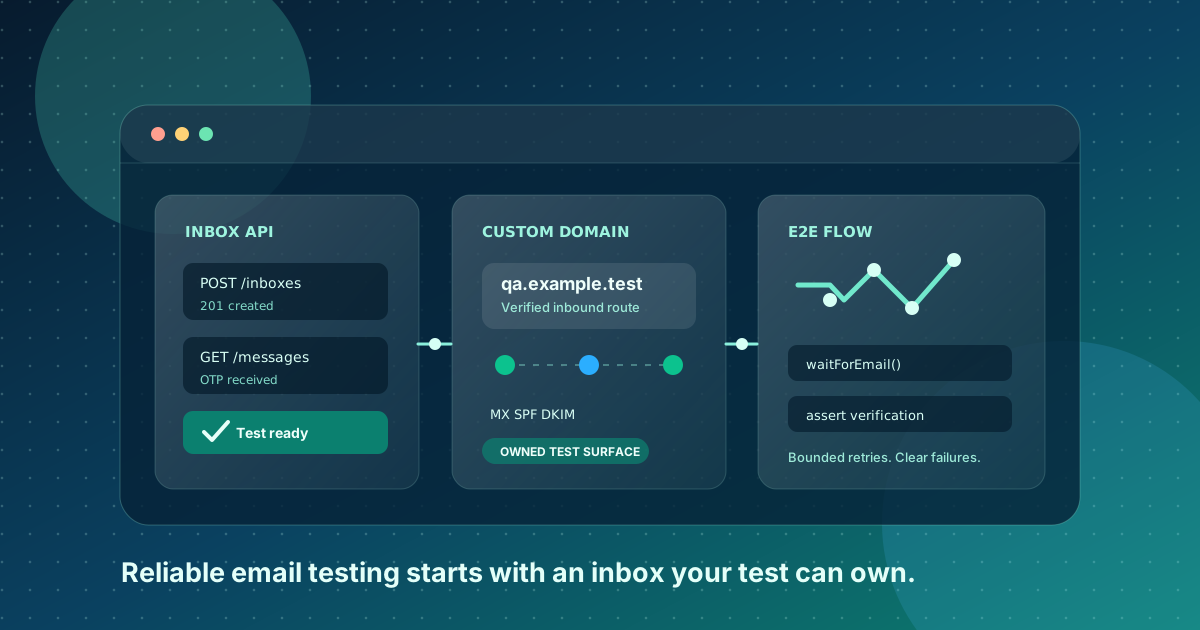
Inboxto is built around that middle ground: separate, persistent receive-only inboxes without a signup flow, with API and custom-domain options for advanced workflows. This guide explains where that model fits, where it does not, and how to build email tests that do not depend on timing luck.
Editorial observation from the Inboxto team, reviewed July 2026: the most useful test-mail question is not "Can I get one OTP?" It is "Can this same test identity receive a reset, a delayed receipt, and a re-verification message after the first test run?" Treating those as separate lifecycles exposes fragile email tests early.
The Short Version
Use a disposable email API when you need your software, not a human, to collect an email and assert something about it. A good setup gives every test run an isolated address, waits for the expected message, extracts the verification code or link, and cleans up afterward.
Choose the inbox type from the test's expected lifetime:
| Test situation | Best inbox choice | Why |
|---|---|---|
| One manual QA check | Free persistent inbox | Easy to open, inspect, and revisit without a personal mailbox |
| End-to-end signup test | API-accessible isolated inbox | The test can wait for and parse its own email |
| Staging notifications or preview deployments | A dedicated custom domain | Clear ownership and less dependence on public shared domains |
| Password-reset or recovery regression test | Persistent test identity | The same address can receive a later reset |
| Banking, production admin, or a real customer account | A controlled company mailbox | Do not make a temporary inbox the recovery channel for high-value access |
The last row matters. Email isolation is useful; losing a critical recovery channel is not. The same distinction applies to ordinary account creation. Our guide to signing up without your real email explains when a separate persistent address is appropriate and when a primary inbox is the safer choice.
What a Disposable Email API Actually Needs
"Disposable email API" is a broad label. Some products expose public inboxes, some offer temporary addresses, and some only forward aliases into an existing mailbox. Before integrating one, define the minimum contract your test suite needs.
1. An address you can create or reserve
The test must know exactly which mailbox it owns before it submits a signup form. Random public inbox names are convenient for a demonstration, but they can collide, expose messages to other people, or make a failure impossible to reproduce.
For each test run, generate a unique local part, such as:
signup-chrome-9f4c@example.test
Use a run ID, worker ID, or deployment identifier rather than a customer's name or email address. A predictable naming pattern also helps you trace a failed run without leaking personal data into logs.
2. A way to wait for the right message
Email delivery is asynchronous. A test that sleeps for five seconds and then assumes the message exists will eventually flake. The API needs a queryable inbox or message endpoint, and your test needs a bounded polling loop or a webhook.
The assertion should identify the expected message with more than just a sender display name. Match a known recipient, a trusted sender domain, an expected subject fragment, or a correlation value placed in the address. Then stop after a clear timeout and surface the inbox state in the failure output.
3. Safe access to text and HTML
Verification messages often contain both plain text and HTML. Read the plain-text part first when extracting a numeric code. For a confirmation link, parse the HTML deliberately rather than using a loose regular expression over the entire raw message.
Do not log whole messages in CI by default. Email can contain tokens, reset links, invoices, or user-like data. Redact message bodies, and expose a secure debug artifact only when your team's retention and access rules allow it.
4. A retention policy that fits debugging
An inbox that disappears immediately can make a failed run impossible to investigate. On the other hand, retaining test mail forever creates unnecessary data. Pick a documented retention window, and deliberately save only the few messages that are needed for a regression record.
Inboxto's product design is useful here because the address is persistent while messages have a retention model, and important messages can be starred. That lets a team keep the identity needed for repeat verification without treating every test email as permanent data.
The Reliable Email-Test Flow
The following pattern works for most signup, one-time password, magic-link, and password-reset tests:
- Create or select a unique test address.
- Submit the product flow with that address.
- Wait for the expected message using a deadline, not a fixed sleep.
- Validate the sender, recipient, and purpose before reading the code or link.
- Complete the verification flow in the browser or API client.
- Assert the user-visible result.
- Record only sanitized diagnostic data if the test fails.
This sequence keeps the test focused on an observable contract: the application sent the correct message, to the correct isolated address, and the recipient could complete the intended action.
Polling Example
Polling is often the simplest choice for a low-volume test suite. Keep the interval modest, add a deadline, and exit as soon as the right message appears:
async function waitForVerificationEmail(address: string) {
  const deadline = Date.now() + 60_000;

  while (Date.now() < deadline) {
    const messages = await inboxApi.listMessages({ address });
    const match = messages.find(
      (message) =>
        message.to.includes(address) &&
        message.from.endsWith('@example-product.test') &&
        message.subject.includes('Verify your email')
    );

    if (match) return inboxApi.getMessage(match.id);
    await new Promise((resolve) => setTimeout(resolve, 2_000));
  }

  throw new Error(`Verification email did not arrive for ${address}`);
}
The endpoint names above are illustrative, not an Inboxto API specification. Adapt the calls to the provider's documented client or HTTP endpoints. More importantly, do not turn the loop into an unbounded retry. A timeout is a signal that the delivery path needs diagnosis.
Webhooks When Test Volume Grows
For a busy CI system, webhooks can reduce polling traffic and make completion faster. They also add operational work: you need request authentication, idempotency, retry handling, and a safe way to correlate the received message with the correct test.
A practical rule is simple:
- Start with bounded polling for a small suite.
- Move to webhooks when polling becomes a measurable source of delay, rate limits, or cost.
- Keep a diagnostic inbox lookup even with webhooks, because callback delivery can fail too.
Custom Domains: The Difference Between a Demo and a Controlled Test Surface
Shared temporary-email domains are convenient for short, low-stakes work. They are also shared infrastructure: another service may reject them, a reputation decision may change, or a public naming scheme may not match how your staging environment is configured.
A custom domain gives your team a clearer boundary. You can create addresses such as checkout-<run-id>@mail.example.test or qa@your-company-domain.example, control who can create them, and separate product testing from personal mail.
It does not guarantee that every third-party signup will accept the address. Each platform can apply its own risk, verification, and terms-of-service checks. Do not market a custom domain as a bypass. Use it because it gives your team ownership, stable naming, and a clean test environment.
DNS Checklist for Receiving Test Mail
Before a test domain can receive mail, confirm the relevant DNS setup with the provider:
- Add the MX records that route mail to the inbox service.
- Publish SPF and DKIM records when the provider requires them for your broader mail workflow.
- Verify the domain in the provider dashboard before attaching it to CI.
- Send a controlled message from a staging sender.
- Confirm the message reaches the intended inbox and is not merely accepted by the sender.
MX tells other mail systems where to deliver incoming email. SPF and DKIM are most important for mail you send, but they are still useful parts of an overall mail-authentication posture. The exact records, priorities, and hostnames come from your provider's current documentation; do not copy DNS values from a blog post.
OTPs, Magic Links, and Reset Emails Are Different Tests
It is tempting to treat every verification email as "find a six-digit number." That misses real behavior.
| Message type | What to test | Common failure mode |
|---|---|---|
| Numeric OTP | Code arrives, is bound to the right session, and expires as intended | Stale code, delayed delivery, or a code accepted twice |
| Magic link | Link is delivered, signed, and consumed by the intended browser session | URL encoding, expired link, or an unsafe redirect |
| Email confirmation | User can complete a one-time ownership check | Verification email sent to the wrong address |
| Password reset | Reset is possible only for the expected account and is invalidated after use | Persistent test identity was not retained |
GitHub's current documentation is a useful public example of why email verification is more than a checkbox: verifying an email strengthens account security, helps with password recovery, and unlocks account features. Its troubleshooting guidance also notes that verification links expire after 24 hours. See GitHub Docs on verifying your email address and GitHub's verification troubleshooting.
For the user-facing side of this workflow, see how to receive verification codes without a real email. It covers the difference between a one-off code and an address you may need for later account recovery.
Playwright and Cypress: Make the Browser Test Own Its Inbox
The best end-to-end email test is isolated. Do not share a single inbox across parallel browser workers. A message from worker A can satisfy worker B's assertion and create an intermittent, difficult-to-reproduce pass.
In Playwright or Cypress, create the address before opening the registration page. Store it in test-scoped state, submit it through the UI, wait for the matching message through your inbox API, then continue in the browser.
For a magic link, prefer opening the exact trusted URL in a new browser context and asserting the result. For an OTP, extract the code with a narrow expression such as \b\d{6}\b, but only after validating the message metadata. A code is not proof of a correct email flow if it came from an old or unrelated message.
Keep a small number of deterministic test cases:
- new signup sends one verification message
- an already verified user does not receive an unnecessary duplicate
- an expired code cannot be used
- a reset link works once and is invalid afterward
- a malformed or expired link produces a safe, clear error
That set exercises the meaningful boundary conditions without turning CI into an uncontrolled mailbox crawler.
Diagnose Delivery Failures in the Right Order
When an email test times out, "the inbox is broken" is usually the least useful conclusion. Delivery has several distinct stages, and each needs a different owner. A disciplined diagnosis avoids rerunning the same flaky test until it happens to pass.
Start from the event that should have caused the message:
- Was the product action accepted? Confirm the registration, reset, or notification job was actually created. A failed form submission is not an email failure.
- Did the application hand mail to its provider? Inspect the provider response, queue event, or application log using a message ID that contains no personal data.
- Did the provider accept the recipient domain? A successful API request can still lead to a bounce, suppression, or policy rejection later.
- Did the inbox service receive the message? Query the intended address, including any message timestamp and recipient data available through the API.
- Did the test identify the correct message? Parallel runs can produce valid mail that does not belong to the current test.
- Did the user-facing verification action work? A received message is only half the contract; the code or link still has to complete the expected flow.
This gives a useful failure report. Instead of "timeout after 60 seconds," record a sanitized state such as:
Signup accepted: yes
Outbound provider message ID: present
Recipient: signup-chrome-9f4c@qa.example.test
Inbox messages after 60s: 0
Expected sender domain: example-product.test
That is enough for the application or mail owner to act, without copying a sensitive reset URL into a shared CI log.
Common Failures and Practical Fixes
| Symptom | Likely cause | Safer next action |
|---|---|---|
| No email appears | The application never queued mail, or the sender rejected it | Check the application event and provider delivery status before changing the test |
| The wrong email matches | Address reuse or an overly broad subject match | Generate a unique address and match recipient plus expected sender |
| A message arrives too late | Queue delay, rate limit, or provider retry | Keep a bounded timeout, then investigate delay metrics rather than extending every test blindly |
| The code is invalid | Stale message, incorrect session, or deliberate expiry | Use a new address per run and assert the message timestamp |
| The magic link opens an error | Link was altered, expired, or tied to a different browser state | Navigate to the exact link in a new test context and verify redirect handling |
| The domain receives no mail | DNS records are missing, not verified, or still propagating | Check the provider's current MX requirements and verify with a controlled sender |
Do not fix an unexplained timeout by adding a long sleep. That hides a delivery regression and makes the suite slower. If a provider has a documented retry window, align your deadline with that window and measure the distribution of arrival times separately.
Separate Test Data from Production Data
Use a domain and address pattern that makes test intent unmistakable. Never point a staging form at a shared customer mailbox, and never send production passwords, payment notices, or health information to a test inbox. The mailbox may be private, but that does not make it an appropriate destination for sensitive production data.
For a production-like staging environment, protect the boundary in several places:
- allow only approved test recipient domains
- disable real billing, fulfillment, and account-change side effects
- keep environment labels in address local parts and message subjects
- rotate API credentials and scope them to the smallest required actions
- scrub email links, codes, and bodies from default logs
This is also why email testing and abuse prevention are compatible goals. Your team can test a legitimate signup or recovery flow without using the setup to evade a third party's controls. Inboxto is an inbound-mail tool; it does not provide SMS verification, sending identities, or a promise that an external service will accept an address.
How Inboxto Fits a Developer Workflow
Inboxto is a receive-only inbox product, so it is not the right tool when your test must send a reply from the same alias or emulate a full outbound mail server. Use a mail sandbox or an alias-forwarding tool if that is the actual requirement.
For inbound verification and notification testing, it offers a different mix:
- persistent anonymous addresses, so a test identity does not vanish after one run
- no-signup access for quick manual checks
- API access and custom domains on Premium for automated or controlled workflows
- starred messages for keeping a small number of important test artifacts
- 32-language support and a Telegram Mini App for teams that also need to inspect mail outside the CI runner
The free tier is suitable for manual experimentation. Premium is listed at $6.99 per month and is the path for advanced features such as API access and custom domains. Confirm the current limits and pricing in the product before committing a team workflow, because plans can change.
If you are still choosing between a short-lived disposable inbox, an alias forwarder, and a persistent inbox, our honest temporary-email comparison explains the category trade-offs. The choice should follow the recovery and testing lifecycle, not a generic "best temp mail" ranking.
A Sensible Deployment Plan
Do not connect an email API to every test at once. Start with one high-value path, such as signup verification in staging:
- Create a dedicated test mailbox pattern.
- Add a single test that waits for the confirmation message.
- Add structured, redacted diagnostics for a timeout.
- Run it in CI with a conservative timeout and no production secrets.
- Add reset and magic-link coverage only after the first flow is stable.
Then decide whether the team needs a custom domain. It is usually worth it when multiple developers, parallel jobs, or external staging environments need predictable address ownership. It is unnecessary if one developer is checking one local email manually.
Final Take
A disposable email API is not just an inbox lookup. It is test infrastructure. Make the address unique, make the wait bounded, validate the message before consuming it, and retain only what helps you diagnose a failure.
For one-off QA, a separate persistent inbox is convenient. For repeatable automation, add API access. For a controlled team surface, use a custom domain. And for accounts whose loss would materially hurt a person or business, keep the recovery channel in a real, controlled mailbox.
That is the practical promise of Inboxto for developers: less clutter in real inboxes, fewer flaky verification tests, and a persistent test identity when your workflow needs one.